


For years, TARGIT’s calculation engine has quietly powered sophisticated analyses. It’s flexible, precise, and remarkably capable.
But let’s be honest: if you don't know the syntax by heart, building a custom calculation can feel like writing in a language you don't fully understand. The new Calculation Editor changes all that.
We're excited to share the Calculation Editor, the new face of TARGIT calculations. It makes our powerful calculation engine more accessible than ever and gives users of every skill level a guided, point-and-click way to create, edit, validate, and reuse calculations directly inside their dashboards and reports.
Want to see a live demo? Watch our on-demand webinar.
Built for Your Entire Team, Not Just the Syntax Experts
For many TARGIT customers, calculations have historically belonged to a small circle of “power users” who knew the functions, the references, and the quirks of the syntax engine by heart. Everyone else either waited on that expertise or avoided custom calculations altogether. The Calculation Editor is designed to close that gap.
Dive into the technical details on TARGIT Community →
If you’re newer to TARGIT, or you simply don’t come from a technical background, the Editor meets you where you are. A guided interface walks you through the process step by step, so you’re never staring at a blank syntax field wondering where to start.
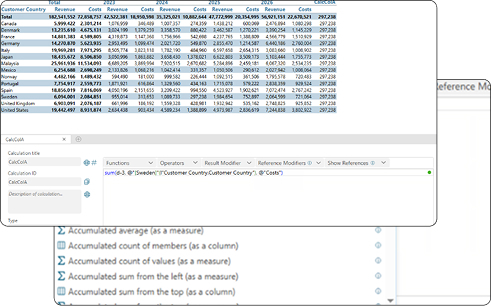
You can construct a calculation by clicking in your crosstab, selecting the rows, columns, measures, and references you need directly from the data in front of you. There’s no memorization, no cheat sheet, and no fear of “breaking” something.
Because the Editor validates your work in real time with error highlighting and one-click Quick Fixes, your users get instant feedback instead of trying to troubleshoot on their own. Someone who has never written a line of TARGIT syntax can produce an accurate, meaningful calculation in their first session, then use the 80+ predefined calculations as both a shortcut and a teaching tool to understand how more advanced expressions are put together.
Here’s the headline for anyone who’s ever hesitated to build a calculation from scratch: you don't need any prior knowledge of the TARGIT calculation syntax to get started.
Want to sum a column of revenue? Place your cursor in the expression, click the column you want, and the reference updates automatically. Instead of memorizing functions and references, you point, click, and calculate.
For those who do love working in code, nothing is lost. The upgraded syntax field now includes auto-complete and suggested calculations, and your existing “old school” syntax still works perfectly fine, so there’s no rework and no relearning required.
Get Inspired and Dig Deeper With Predefined Calculations
Sometimes the hardest part of analysis is simply knowing where to begin. That’s why the Calculation Editor comes with 80+ predefined calculations you can search, apply, and adapt in seconds.
Whether you’re calculating sums, averages, and percentages or something more advanced, there’s likely a predefined option ready to go, complete with descriptions to explain what each one does. Beyond saving time, this library doubles as a source of inspiration for new ways to slice and interrogate your data.
Calculate With Confidence, Thanks to Built-In Validation
Accuracy is everything in reporting, and a single misplaced reference can quietly skew a result. The Calculation Editor’s built-in syntax checker catches those issues before they reach your reports.
Errors are highlighted directly in the syntax, and a status indicator turns green when everything checks out. Even better, the Editor doesn’t just flag problems; it helps you fix them with suggestions and Quick Fixes, so users of all backgrounds and skill levels stay on the right track.
Room to Grow for Power Users
The Calculation Editor lowers the barrier to entry for beginners without putting a ceiling on seasoned experts. Power users get support for advanced references, reference and result modifiers, and controls for handling out-of-scope values, so a calculation returns a sensible result instead of an “Undefined.”
Calculate margins, compare performance over time, build custom KPIs, or define complex business logic with an interface that's simpler, smarter, and more accessible than ever before.
Get to Know the TARGIT Calculation Editor
The new Calculation Editor is available now for Cloud customers, with the on-prem release planned in the coming weeks. You can read the full technical details on the TARGIT Community forum.
Ready to see the new Editor in action? Watch our on-demand webinar for an in-depth walkthrough of the interface, tips & tricks, and a live Q&A.
This article includes AI-generated content and was reviewed by FORTERRO.


/Forterro_Arrow-On-Colour.svg)
